Ratings for Clubs and Organized Play
Use AI-powered skill ratings to place members into leagues, run assessment sessions, and give every player a data-driven view of their game.
Also check it out here: pb.vision/clubs
Overview
PB Vision turns pickleball video into objective skill ratings and detailed analytics. Club organizers, league directors, and event coordinators use PB Vision to replace subjective assessments with data, seed leagues, run rating sessions, and track player progression over time. Here's a sample game from Anna Bright to explore the product experience.
Every game produces an AI-generated skill rating on the 2.0-5.5 scale across six dimensions: Serve, Return, Offense, Defense, Agility, and Consistency. The rating system is performing very well in this range and gets better each week. Ratings are performance-based, measuring how a player played, not just whether they won. After about 10 games, a player's rating stabilizes into a reliable, objective read of their ability. More on our rating system and how it compares/contrasts with DUPR here.
The best way to experience PB Vision for club-wide ratings is to start with a regular subscription and use it through a club, coach, or individual account. Upload a few recorded games and you'll get a clear sense of the ratings in action. Most of our clubs use PBV for club-wide rating assessments.
Why Clubs Use PB Vision
Objective skill ratings Every game produces ratings on the 2.0-5.5 scale across six skill dimensions. Ratings are performance-based, measuring how a player played, not just whether they won. After about 10 games, a player's rating stabilizes into a reliable, objective read of their ability.
Fair and consistent PB Vision removes the subjectivity from player assessment. No more volunteer assessor teams debating who belongs in which division. When disputes come up, the conversation is grounded in data (shot quality, error rates, movement patterns) rather than opinion. Some clubs have reduced their assessor teams from 5 volunteers down to 1 reviewer handling edge cases.
Works at any scale Whether you're rating 20 players or 600, the workflow is the same. Record games, tag players, and let the AI handle the analysis. A single subscription is all you need to get started.
Players get shareable profiles Every rated player gets a profile showing their ratings, trends, and game history. Players can share their profile link with the club, track their own progress, and see exactly what's driving their rating.
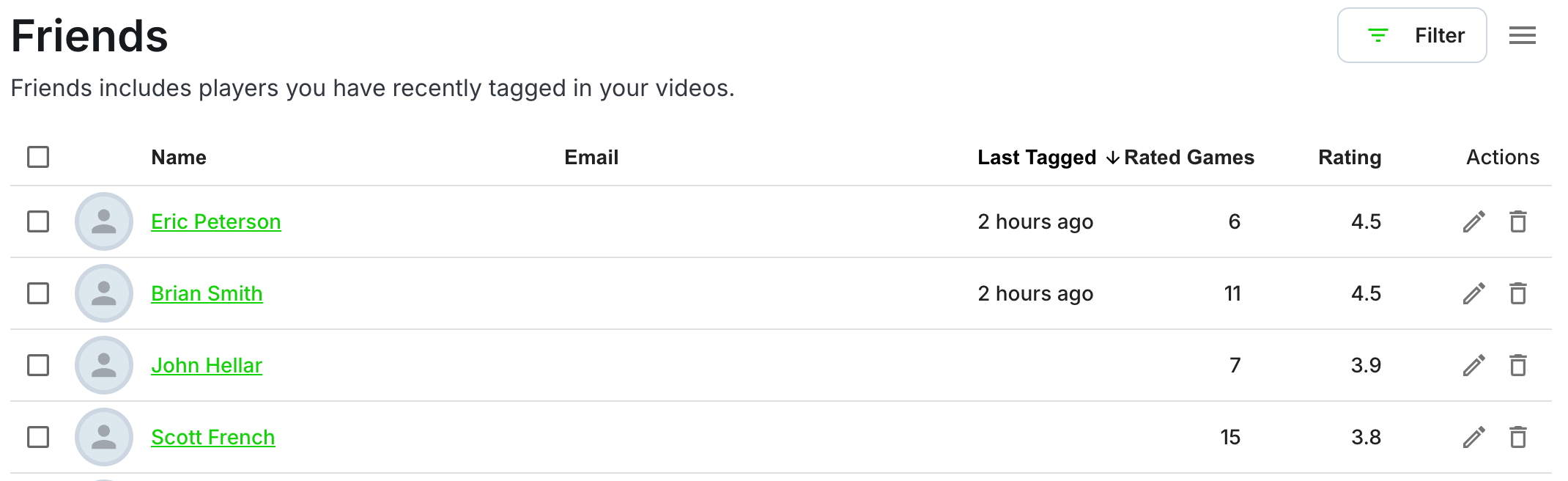
Club organizers can also use the Friends list at https://pb.vision/settings/friends to manage recently tagged players, search a roster, and speed up review for repeat league or assessment sessions.
How to Run Ratings at Your Club
This is the step-by-step workflow that clubs of all sizes are using today.
1. Set up a club account Create a PB Vision account for your club or program. A single Starter or Premium subscription is all you need. Most clubs recover the cost by adding a few dollars to league fees or dues.
2. Record assessment sessions Schedule structured sessions where players play competitive games while being recorded. Mount a phone on a tripod or fence clip with the full court visible. The PB Vision app includes CourtFocus, which guides you to center court with a lock-on indicator before recording. Designate 1-2 "recording captains" or let a coach handle it. If you have indoor courts, there's a chance you can automate the recording process entirely with fixed cameras through our facility partners (see Court Insight for Facilities).
For best results, follow the Framing and Court Alignment Guidelines: entire court visible with all 4 corners, camera at least 5 feet off the ground, landscape mode, stable mount (no handheld). Each game should be uploaded individually and be 30 minutes or less.
3. Upload and tag players Upload games through the PB Vision app. Once processed (most videos finish in about 30 minutes), tag each player by email. This links the game to their profile and gives them access to their stats. Players tagged by email who don't have an account yet will receive an invitation to create a free one.
4. Ratings stabilize over time After about 10 games per player, their skill rating stabilizes into a strong, objective read of their ability. The lifetime rating uses up to 90 recent games, weighted toward the most recent. Upload a mix of wins, losses, and close matches for the best accuracy.
5. Use ratings for placement Use PB Vision skill ratings to seed leagues, place players into divisions, and track progression over time. Players whose ratings seem surprising can be reviewed against their actual game data for edge-case decisions.
6. Review your Friends list In the PB Vision app, go to Profile > Edit Profile > Friends (or here). Friends includes players your club account has recently tagged in videos, with name, email, last tagged date, rated games, and PB Vision rating in one table.
Use the filters to search by name or email, narrow by rating, or focus on recently tagged players. From the menu, organizers can add players, import friends from CSV, export the list to CSV, edit player details, or remove stale entries.
This is useful for club rating sessions because the same account that records and tags games can also maintain a roster-style view of player ratings and contact info.
Handling Fairness and Selective Uploads
The biggest operational concern clubs raise: what if players only upload their best games?
Two answers from real club deployments:
Structured assessment sessions under a club account. The club controls what gets uploaded. Players play competitive games during scheduled sessions and the club handles recording and uploading. This is the most reliable approach.
Even with selective uploads, the model converges. If you let players build their own profiles and share their PB Vision links with the club, the rating still converges once there's enough data. Consistent high-level performance over time is hard to fake.
Most clubs combine both approaches. Run scheduled assessment sessions for official placement, and let players supplement with their own uploads for ongoing tracking.
Analytics for Leagues and Events
Self-Hosted Events
Running a league, round robin, or tournament? You can record and analyze games yourself with a PB Vision subscription.
Mount cameras on fences or tripods at each featured court
Sign helpers into the same event account to upload games
Share one folder link with all event recordings
Players find their games, tag themselves, and view their stats and ratings
Most organizers add a few dollars to player entry fees to cover video processing (roughly $1/game)
For a lighter-touch approach, bring tripods and PB Vision net banners and encourage players to use the PB Vision app on their own phones. The first video is free, so it's an easy way for players to try it.
Rally Vision Partnership (Events and Tournaments)
For organizers who want a turnkey filming experience, Rally Vision handles the recording, production, and delivery of PB Vision analytics to players. They take the hassle off the organizer so you can focus on running the event.
Rally Vision is primarily based in California and exploring expansion to other regions. PB Vision can introduce you directly to their team.
Interested? Email support@pb.vision and we'll connect you.
How Much Does It Cost?
For the club organizer A PB Vision subscription starts at $99.99/year (Starter) or $396/year (Premium). Most clubs use a single subscription and recover the cost through league fees, dues, or small add-ons. Additional minute packs are available if you need more capacity.
Per-game math PB Vision works out to roughly $1 per 12-minute game, or about $0.25 per player in doubles. A Premium subscription gives you enough capacity for roughly 400 games per year.
For players Players tagged in games can see their per-game stats and ratings for free by creating a free account. Players who want ongoing trends and cross-game analysis can subscribe individually.
For events Most organizers add a few dollars to player entry fees to cover processing. Depending on the volume of games, a Starter or Premium subscription with additional minute packs covers most events.
For full pricing details, see Subscriptions, Minutes, Ambassador Program.
What PB Vision Can and Can't Assess
PB Vision measures: Shot types (dinks, drives, drops, lobs, serves, returns, speedups), shot placement, ball speed, player positioning and movement, error rates (forced and unforced), rally patterns, and court coverage. From all of this, the AI computes skill ratings across six dimensions on the 2.0-5.5 scale. The system is actively being refined and the range will expand as the model improves.
PB Vision partially captures: Strategic shot selection. The AI can see what shot a player chose in a given situation and track outcomes, but it doesn't currently assess whether a different choice would have been better in context.
Human observation still adds value for: Game management (pace control, mid-game adjustments), partner coordination and communication, and psychological performance under pressure. These are largely invisible to the camera.
Our recommendation: Use PB Vision as your primary rating engine for the objective, measurable parts of the game. Keep a small review panel (1 person instead of 5) for edge cases where a player's rating seems surprising relative to how they're perceived. The conversation becomes about data rather than opinion.
For more on how ratings work, see PB Vision Skill Ratings.
Recording Tips for Clubs
Good video quality leads to better analysis. Here are the essentials:
Entire court must be visible, including all 4 corners
Camera at least 5 feet off the ground (tripod, fence mount, or stable platform)
Landscape mode only
At least 1080p at 30fps
Stable mount, no handheld footage
Start with the first serve, end at paddle tap. No warmups or drills
Each game uploaded separately, 30 minutes or less
Do NOT trim dead time between rallies. PB Vision uses it for calibration
For the full guide, see Framing and Court Alignment Guidelines and How to Record Your Pickleball Game.
Facilities Looking for Camera Hardware?
This page is focused on club operations: ratings, leagues, events, and organized play. If you're a facility owner looking for fixed camera systems, check out Court Insight for Facilities and Clubs for hardware options including Save My Play and PodPlay integrations.
Ready to Bring PB Vision to Your Club?
Start with a subscription, record a few sessions, and see the ratings in action. Most clubs are up and running within a week.
Subscribe | Email us at support@pb.vision | Learn more about skill ratings
Looking For More?
If you still have questions or run into issues, check out our Contact Us guide for the best way to reach us!